
 February 12th, 2019
  Nilesh Chaurasia
 HTML Unordered List
HTML Unordered List is used to insert the data into the bullets formate. It is also known as bullet lists or HTML ul.
HTML Unordered List
<ul>
   <li>Ice-Cream</li>
   <li>Chocobar</li>
   <li>Cold-Coffee</li>
</ul>
This above code shows that how can you write any data into the bullets formate. And this is the default formate of >ul< list.
HTML ul
You also change the bullets into the another bullets formate like circle or square bullets .
If you want to change it, than you have to use the type attribute and it will be display in the form like DISC | SQUARE | CIRCLE .
Example – Full Code for the HTML ul List
<html>
     <body>
	       <h2>Different  types of Bullets in Unordered List</h2>
           <ul>
             <li>Ice-Cream</li>
             <li>Chocoba</li>
             <li>Cold-Coffee</li>
           </ul>
           <ul type="square">
             <li>Sugar</li>
             <li>Salt</li>
             <li>Sour</li>
           </ul>
           <ul type="disc">
             <li>Car</li>
             <li>Bike</li>
             <li>Scooty</li>
           </ul>
		   <ul type="circle">
             <li>Aroplane</li>
             <li>Bus</li>
             <li>Ship</li>
          </ul>
     </body>
</html>
These are the different bullets options of the ul and it can be specified by the type attribute.
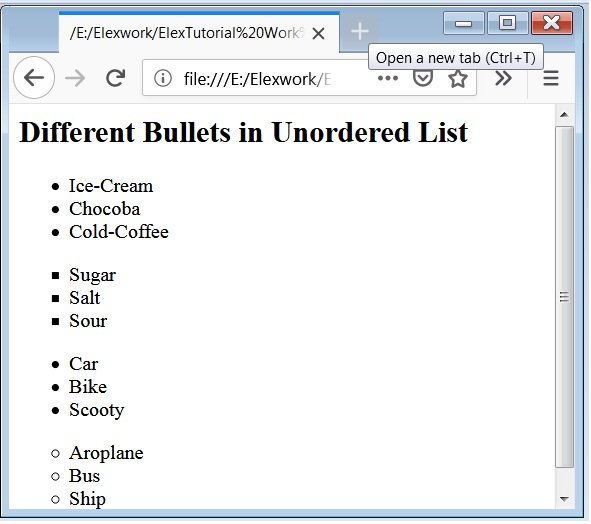
Caution: DISC is the default ul list. You also change the bullets of the unordered lists with the use of CSS Properties.
 Posted in
  Tags:
Tags: 




You are a very clever person!