
 May 4th, 2019
  Nilesh Chaurasia
 CSS Descendant Selector
CSS Descendant Selector is used to style a specific child element. The Descendant selector is represented by the white space between the two selectors.
Example 1 – CSS Descendant Selector Property
<!DOCTYPE html>
<html>
	<head>
		<style>
			div h2
			{
				color:white;
				background-color: darkcyan;
				text-align:center;
			}
			.header h2
			{
				color: white;
				background-color: deeppink;
				text-align: center;
			}
			#header1 h2
			{
				color: white;
				background-color: lightcoral;
				text-align: center;
			}
		</style>
	</head>

	<body>
		<div>
			<h2> Elex Tutorial</h2>
		</div>
		<div class="header">
			<h2> HTML Tutorial</h2>
		</div>
		<div id="header1">
			<h2> CSS Tutorial</h2>
		</div>
		<h2>PHP Tutorial</h2>
	</body>
</html>
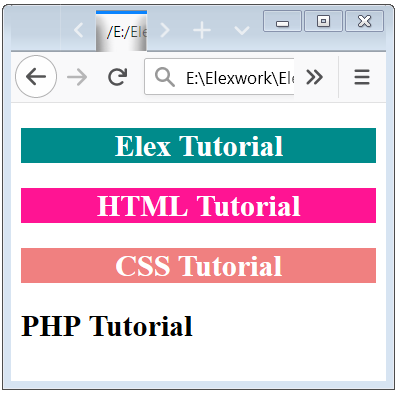
In these examples, we have specified that there is an h2 element which is inside a div element. It means this style setting is not applicable to any other h2 element on the page which does not satisfy this child-parent combination.
In the first example, we have used tag inside tag. In the second example, we have used an h2 tag inside a class. In the third example, we have used a tag h2 inside a id.
Multilevel Descendant Selector
In the previous example, we have used 2 level parent-child combination but in more complex design requirements you can specify any number of levels of the child-parent relationship. And in this case, if a complete combination is satisfied then only the specified style is applicable.
Example 2 – Multilevel Descendant Selector Property
<!DOCTYPE html>
<html>
	<head>
		<style>
			div div h2
			{
				color:white;
				background-color: darkcyan;
				text-align:center;
			}
			.header div.main h2
			{
				color: white;
				background-color: deeppink;
				text-align: center;
			}
		</style>
	</head>

	<body>
		<div>
			<div>
				<h2> Elex Tutorial</h2>
			</div>
		</div>
		<div class="header">
			<div class="main">
				<h2> HTML Tutorial</h2>
			</div>
	</body>
</html>
In these examples, we have specified that there is an h2 element which is inside a div element and this div element is also inside a div element. It means this style setting is not applicable to any other h2 element on the page which does not satisfy this child-parent combination.
In the first example, we have used h2 tag inside a div tag and this div tag is also inside a div tag. In the second example, we have used an h2 tag inside a div tag and this div tag is inside a class.

 Posted in
  Tags:
Tags: