
 February 27th, 2019
  Nilesh Chaurasia
 CSS Heading Styles
- CSS Heading Styles term means that, you can style your heading using the CSS Properties.
- The Heading element is not attractive without CSS Style.
- Using CSS Style on the Heading than heading look and feel will be changed, and that’s why heading will look more attractive.
- You can apply border, margin, color, padding, font-size, latter-spacing and many more styles will be applying on the heading.
Example 1- Style h1 CSS Example
<!DOCTYPE html>
<html>
  <body>
    <h1>This is a heading.</h1>
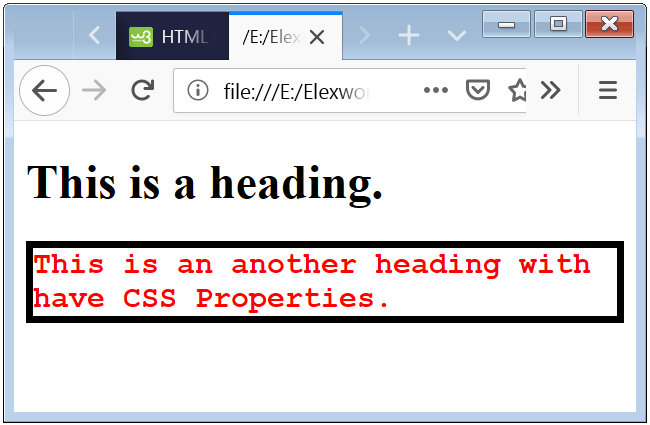
	<h1 style="color:red; font-family:courier; font-size: 20px; border:5px solid black;" > This is an another heading with have CSS Properties.</h1>
  </body>
</html>
The above code shows that how can you apply style on a heading or h1 tag.
Basic CSS Properties Apply On The Heading
| CSS Property | Application | Example |
|---|---|---|
| background-color | Change the background color. | background-color:blue; |
| text-transform | Change the text case to upercase. | text-transform: upercase; |
| letter-spacing | Change the text letter spacing. | letter-spacing: 6px; |
| line-height | Change the spacing between the lines of Heading. | line-height: 1.8; |
CSS h2 Style Example with more Properties
Example 2- Advance Properties of CSS which Apply on Heading
<!DOCTYPE html>
<html>
  <body>
    <h2 style="text-align:justify; line-height:1.8; letter-spacing:5px;	text-transform:uppercase; background-color:yellow;"> This is the Heading with have advance CSS Properties.</h2>
  </body>
</html>
The above code have some advance CSS Styles which appealing the Heading.

 Posted in
  Tags:
Tags: